How to Check Your Etisalat Number in UAE (2026): Code & App
Quick answer: To check your Etisalat (e&) number, dial *101# from the SIM, choose Account information and then Know My Number. Your number is shown on screen in a few seconds. The code works on prepaid and postpaid lines, needs no mobile data and no balance. You can also see the number in the e& UAE app, on your SIM pack or bill, and you can list every number registered to your Emirates ID through TDRA’s free Hesabati service.
All ways to check your Etisalat number
| Method | What you need | Best for |
|---|---|---|
| *101# then Account information then Know My Number | The e& SIM in your phone, with network signal | Fastest check; works without internet |
| e& UAE app | Internet and an e& account login | Seeing all your lines in one place |
| e& online account (My Account) | Web browser and login | Postpaid customers and family accounts |
| SIM pack, order email or bill | The paperwork from the purchase | A new SIM not yet in a phone |
| Phone settings | The SIM inserted | A quick look, but often blank |
| Call a friend | Another phone nearby | When nothing else works |
| TDRA Hesabati | Emirates ID and UAE PASS | Every active number under your ID, across all operators |
| e& customer care | Proof that you own the line | Lines you cannot access any other way |
Method 1: dial *101# (Know My Number)
- Open your phone’s dialler. On a dual-SIM phone, select the e& SIM you want to identify.
- Dial *101# and press call.
- Choose Account information from the menu by replying with its option number.
- Choose Know My Number.
- Your mobile number is displayed. Write it down or save it as a contact with a label for that SIM.
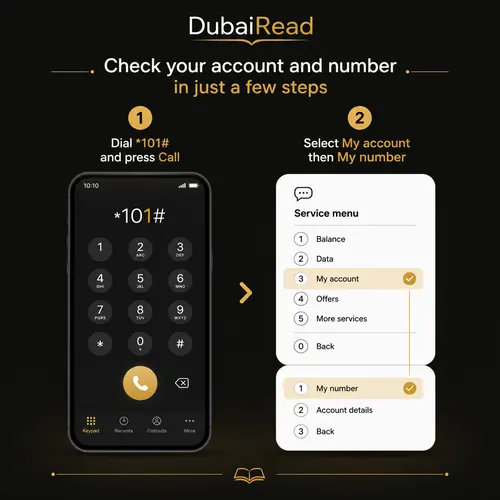
Menu numbers can move when e& adds options, so look for the wording rather than relying on an old option number. The service is free and works on any phone, including basic phones, because it uses the network’s USSD channel rather than internet data.
What else is in the *101# menu
| Prepaid (Wasel) menu | Postpaid menu |
|---|---|
| Credit enquiry | Current amount, Smiles points and FLTE usage |
| Allowances enquiry | Billing and payment information: last bill, payments received, bill summary |
| Account information: account and registration enquiry, Know My Number, Smiles points balance | Allowances and add-on enquiries |
| Recharge by voucher | Account information: account and registration enquiry, Know My Number, Smiles points balance, device contract details |
| Change to New Wasel |
The same menu lets prepaid users buy add-ons, data packs and roaming packs, so *101# is worth saving even after you know your number.

Method 2: the e& UAE app
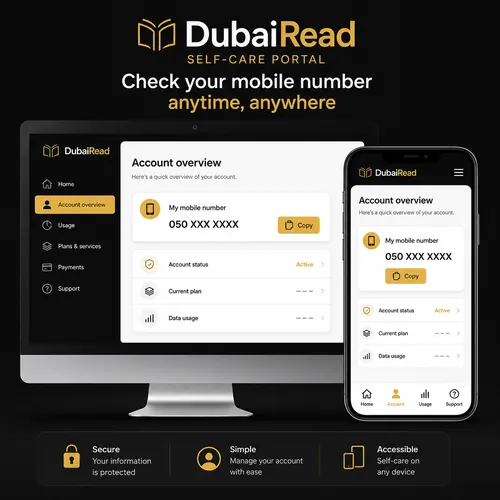
- Open the e& UAE app and sign in. If you are not registered yet, sign up with your e& number and the one-time code sent to it.
- On the home screen, pick the mobile line from your list of services.
- Open the account or line details. The mobile number is shown at the top of the line’s details.
If several lines are linked to your account, for example family numbers or a home internet service, make sure you are looking at the right one. The app also shows your balance, data and add-ons for each line.

Method 3: e& online account
Sign in to your e& account on the website and open your list of mobile services. Postpaid customers can also read the number from any recent bill, which names the mobile service being billed. Never share your password or one-time code with anyone offering to “find” your number.
Method 4: SIM pack, receipt or bill
The cardboard holder your SIM came in, the shop receipt or the online order confirmation usually shows the mobile number. Be careful not to confuse it with the SIM serial number:
| Number on the paperwork | What it is | Looks like |
|---|---|---|
| Mobile number (MSISDN) | Your phone number | 05X XXX XXXX, or +971 5X XXX XXXX |
| SIM serial (ICCID) | The ID of the physical SIM card | 19 or 20 digits, usually starting 89971 |
| PUK code | Unlocks a blocked SIM | 8 digits |
| Order or account reference | Purchase or billing reference | Varies |
Method 5: phone settings
| Phone | Where to look |
|---|---|
| iPhone | Settings, then Phone (or Cellular / Mobile Service), then My Number |
| Android (most brands) | Settings, then About phone, then Status or SIM status, then Phone number |
| Samsung | Settings, then About phone, then Phone number |
| Dual SIM or eSIM | Check under the specific SIM or eSIM line in mobile network settings |
Phones read the number stored on the SIM card, and many UAE SIMs do not store it, so the field can be blank or show “unknown”. It can also show an old number after a SIM swap. Use *101# to confirm.
Method 6: call or message someone
Call or send a text to a friend’s phone and read the number on their screen. Normal call or SMS charges apply, and it will not work if your caller ID is hidden or the line has no credit for outgoing calls.
Check every number registered under your Emirates ID (Hesabati)
TDRA’s Hesabati service lists all active mobile and fixed-line numbers registered to your Emirates ID with e&, du and Virgin Mobile. It is free and is the best way to spot a SIM someone registered in your name without your knowledge.
- Go to the TDRA website (or the TDRA app) and open the Hesabati service.
- Sign in with UAE PASS.
- If asked, choose Create an account; TDRA creates it automatically from your UAE PASS details.
- Wait a few minutes for the list of your active numbers to load.
| Hesabati shows | Notes |
|---|---|
| The mobile or fixed number | Active numbers only; disconnected numbers do not appear |
| Account type | Prepaid or postpaid |
| Subscription plan | The plan name on that line |
| Registration expiry date | Matches your Emirates ID expiry date |
If you see a number you do not recognise, select Make A Complaint under it, choose the operator, describe the problem and submit. You get a reference number and TDRA follows up by email. You can also call TDRA on 800 12 or report it to the operator directly.
Is it an Etisalat number? Prefixes and porting
e& mobile numbers traditionally start with 050, 054 or 056. Because UAE numbers can be moved between operators while keeping the same number, the prefix alone does not prove which network a line is on today. The *101# menu or your operator account is the reliable check.
If *101# does not work
| Problem | What to do |
|---|---|
| “Connection problem or invalid MMI code” | Check you have network signal, restart the phone and dial again from the e& SIM |
| Wrong SIM used on a dual-SIM phone | Set the e& SIM as the line for calls, or choose it when dialling |
| No signal or SIM not detected | Reinsert the SIM or check the eSIM is switched on |
| Line suspended or barred | Renew the line’s registration with your Emirates ID, then try again |
| Still no result | Use the app or paperwork, or call e& customer care on 101 from an e& line |
A line can be suspended if its Emirates ID registration has expired. Our guides on updating your Emirates ID with Etisalat and renewing an Etisalat SIM registration cover the fix.
Useful e& codes after you find your number
| Code | What it does |
|---|---|
| *101# | Self-service menu: number, balance, allowances, add-ons |
| *121# | Check prepaid balance |
| *170# | Check data balance |
| DATA to 1010 | Data balance by SMS |
| *100*number*amount# | Transfer credit to another prepaid e& number |
| *050# | Deal of the Day offers for Wasel prepaid |
For more detail, see how to check your Etisalat balance and how to transfer Etisalat balance. On a du or FIVE SIM the codes are different: see how to check your du number and FIVE SIM number check.
Frequently asked questions
What is the code to check my Etisalat number?
Dial *101#, choose Account information and then Know My Number. The number appears on your screen.
Does *101# work on postpaid?
Yes. Both the prepaid and postpaid *101# menus include Know My Number under Account information.
Do I need balance or internet to check my number?
No. *101# is free and uses the mobile network, not data.
Can I find someone else’s Etisalat number with these methods?
No. They only show the number of the SIM you are using or lines in your own account. To identify an unknown caller, see who called me from this number.
How do I see all numbers registered under my Emirates ID?
Use TDRA’s free Hesabati service with UAE PASS. It lists active numbers with e&, du and Virgin Mobile.
Is *248# the Etisalat number check code?
*248# is quoted on some websites, but e&’s own guidance lists *101# with Know My Number. Use *101#.
Why does my phone not show my number in settings?
Many SIMs do not store the number, so the setting stays blank. *101# reads it from the network instead.
Can I check the number of an e& SIM before putting it in a phone?
Yes. Look at the SIM holder card, the receipt or the online order confirmation. Do not confuse the 19 or 20-digit SIM serial with the phone number.
Menus and services were checked against e&’s official *101# and Wasel pages and TDRA’s Hesabati guidance on 20 October 2026.