How to Transfer Etisalat Balance in UAE (2026): Code, Fees, Limits
Quick answer: To transfer Etisalat (e&) balance, dial *100*recipient number*amount#, for example *100*0501234567*10# to send AED 10, and press 1 to confirm. You can send from any active prepaid or postpaid e& line to an e& prepaid number. The minimum is AED 2, the maximum AED 150 a day, and the sender pays a 5.25% fee including VAT. You can also share data with #100#, send credit abroad by texting the number to 1700, or use Share Credit and Data in the e& UAE app.
Etisalat balance transfer at a glance
| Item | Details |
|---|---|
| Code | *100*recipient number*amount# |
| Who can send | Active Wasel prepaid and postpaid e& customers |
| Who can receive | e& prepaid numbers (Wasel and FIVE) |
| Minimum per transfer | AED 2 |
| Daily maximum | AED 150 |
| Monthly maximum | AED 1,500 prepaid; AED 500 postpaid |
| Fee | 5.25% of the amount, VAT included, paid by the sender |
| Registration needed | No |
| Confirmation | Press 1 to confirm or 2 to cancel |
How to transfer Etisalat balance with *100#
- Check the recipient’s number and that it is an e& prepaid line.
- From your e& line, dial *100*, the recipient’s number, *, the amount in dirhams and #. Example for AED 10: *100*0501234567*10#.
- Press call. You receive a message showing the number, the amount and the charge.
- Press 1 to confirm, or 2 to cancel if anything is wrong.
- Both you and the recipient receive an SMS once the transfer is complete.
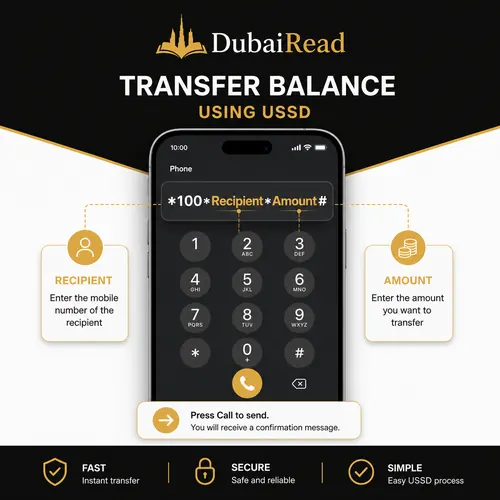
You can also dial *100# on its own and follow the menu, which is useful if you are not sure of the exact format.
How much does it cost? The 5.25% fee
The recipient receives the full amount you choose. The fee is taken from your balance on top.
| You send | Fee (5.25%) | Total deducted from you | Recipient gets |
|---|---|---|---|
| AED 2 | AED 0.11 | AED 2.11 | AED 2 |
| AED 10 | AED 0.53 | AED 10.53 | AED 10 |
| AED 50 | AED 2.63 | AED 52.63 | AED 50 |
| AED 100 | AED 5.25 | AED 105.25 | AED 100 |
| AED 150 | AED 7.88 | AED 157.88 | AED 150 |
Make sure your own balance covers the amount plus the fee, or the transfer will fail. Postpaid senders see the transfer and fee on their monthly bill.
Transfer limits for prepaid and postpaid
| Type | Minimum | Daily maximum | Monthly maximum |
|---|---|---|---|
| Normal transfer, prepaid sender | AED 2 | AED 150 | AED 1,500 |
| Normal transfer, postpaid sender | AED 2 | AED 150 | AED 500 |
| PIN-secured transfer, prepaid sender | AED 2 | No daily cap (fair use up to AED 100,000 a month) | No cap (fair use) |
| PIN-secured transfer, postpaid sender | AED 2 | AED 150 | AED 500 |
If you send credit often, for example to family members or staff, a PIN-secured transfer removes the normal prepaid limits and protects the service from misuse.
PIN-secured transfers
| Action | How |
|---|---|
| Get a transfer PIN | Send CTPIN, CT PIN or CPT to 1010 (32 fils including VAT) |
| Transfer with your PIN | Dial *100*recipient number*amount*PIN# |
| Change your PIN | Dial *143*old PIN*new PIN# |
| Forgot your PIN | Call 101 or visit an e& store |
| Cancel the PIN | Visit an e& store |
Transfer balance in the e& UAE app
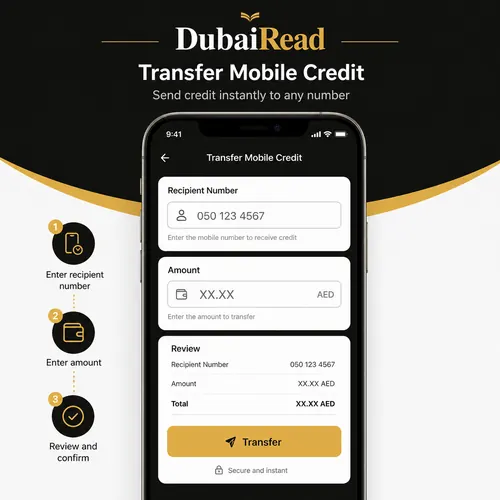
- Open the e& UAE app and sign in.
- Go to Share Credit and Data, under Pay & Recharge for friends.
- Enter the recipient’s number and the amount.
- Review the amount and fee, then confirm.
Auto-schedule a regular transfer
e&’s Auto Schedule sends credit automatically to up to 5 recipients, once, twice or three times a month, at no extra charge beyond the normal transfer fee. Set it up through the *100# menu and cancel it the same way. It suits parents topping up a child’s phone or employers supporting staff lines.
How to transfer data on Etisalat
On selected plans you can share your data allowance instead of credit:
| Item | Details |
|---|---|
| Code | #100*recipient number*data in MB#, for example #100*0501234567*1000# for 1GB; or dial #100# |
| Recipients | Any e& prepaid or postpaid number |
| Eligible senders | Selected plans only; monthly plans of 1GB or more allow up to 5 transfers a month |
| Prepaid amounts | In multiples of 100MB, up to 100GB per transfer, keeping at least 200MB |
| Postpaid amounts | Up to 5GB per transfer |
| Fee | AED 3 per 100MB, before VAT |
| Validity for the recipient | 10 days; used before the recipient’s own data |
| Recipient checks balance | e& UAE app or *121*170# |
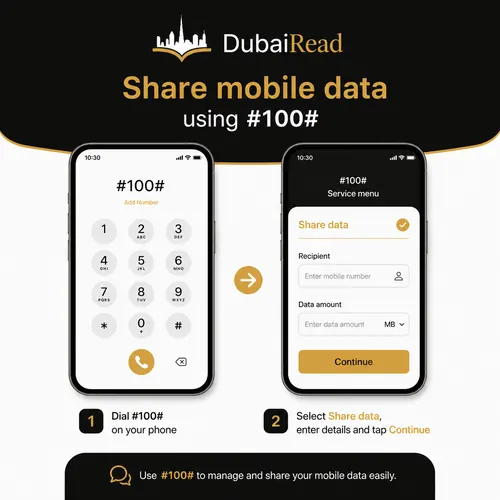
Data transfer is expensive compared with buying a pack: 1GB costs AED 30 before VAT to transfer, while e& sells a 1GB daily pack for AED 5. Transferring credit and letting the recipient buy a pack is usually cheaper. See our guide to e& data offers.
Send credit abroad (international transfer)
- Text the international prepaid number with its country code, for example 9198XXXXXXXX, to 1700 (free), or dial *100# and choose international.
- Follow the reply to pick a denomination; the price in AED is shown before you confirm.
- Confirm. The recipient’s credit is added instantly and they get an SMS.
| International limit | Value |
|---|---|
| Transactions per day | 3 |
| Transactions per month | 10, counted from the 1st |
| Maximum per month | AED 500 |
| Fees | No extra charge beyond the denomination price shown |
Visitors with an e& prepaid account can use leftover credit to top up a prepaid line in their home country before leaving the UAE.
Ask someone to send you credit
Prepaid users can send a free request: dial *107*their number*amount#. The other person receives an SMS and can reply with the *100# transfer code. You can send up to 2 requests a day. If you have no credit at all, e& also offers Reserve Credit of up to AED 50; see how to take a loan in Etisalat.
Common errors and fixes
| Problem | Cause | Fix |
|---|---|---|
| “Invalid MMI code” | Wrong format or missing * | Type *100*number*amount# exactly, with no spaces |
| Transfer rejected | Recipient is postpaid or not on e& | Credit can only go to e& prepaid numbers; use international transfer for overseas lines |
| Insufficient balance | Amount plus 5.25% fee exceeds your credit | Recharge or send a smaller amount |
| Limit reached | AED 150 today or your monthly cap used | Wait until the next day or month, or use a PIN-secured transfer |
| Sent to the wrong number | Number typed incorrectly | Contact e& on 101 straight away; reversals are not guaranteed |
| FIVE line trying to send | FIVE lines cannot transfer credit out | FIVE lines can only receive credit |
Check the result
After a transfer, check your balance with *121# and ask the recipient to check theirs. For all balance methods, see how to check Etisalat balance. If you are not sure of your own number, see how to check your Etisalat number. Moving between networks? Credit cannot be transferred from e& to du; see how to transfer du balance for du lines.
Frequently asked questions
What is the code to transfer balance from Etisalat to Etisalat?
Dial *100*recipient number*amount#, for example *100*0501234567*10#, and press 1 to confirm.
How much does Etisalat charge for balance transfer?
5.25% of the amount, VAT included, paid by the sender. Sending AED 100 costs you AED 105.25.
What is the maximum Etisalat balance transfer per day?
AED 150 a day, with a monthly limit of AED 1,500 for prepaid senders and AED 500 for postpaid senders.
Can I transfer balance to a postpaid number?
No. Credit transfers go to e& prepaid numbers only. Data can be shared with both prepaid and postpaid numbers on eligible plans.
Can postpaid customers transfer balance?
Yes. Postpaid lines can send up to AED 150 a day and AED 500 a month, added to the monthly bill.
How do I transfer data on Etisalat?
Dial #100*recipient number*data in MB#. It costs AED 3 per 100MB before VAT and works only on selected plans.
Can I send Etisalat credit to another country?
Yes. Text the international prepaid number to 1700 or use the app. You can make up to 3 transfers a day and AED 500 a month.
Can I transfer Etisalat balance to du?
No. e& credit can only be transferred to e& numbers.
Codes, limits and fees were checked on e&’s official Data & Credit Transfer and credit transfer support pages on 20 October 2026.